Informed Delivery Guide
Informed Delivery Guide
Informed Delivery adds a digital impression to eligible physical mail. Subscribers can see mail previews in the USPS Daily Digest, and business mailers may add campaign images and a clickable URL.
How it works
How the customer experience works
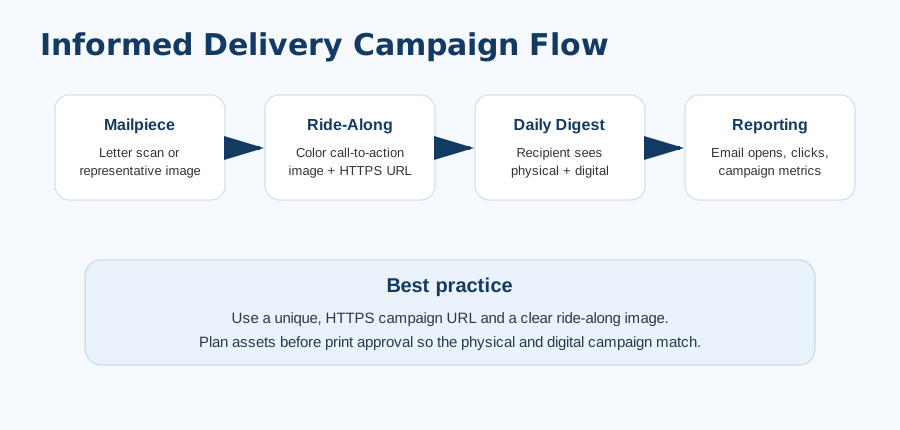
Subscribers see a grayscale preview of each mailpiece in the USPS Daily Digest. Business mailers can pair that preview with a full-color ride-along image and a clickable campaign URL.
- Brand Display Name — shown to the recipient in the USPS experience.
- Campaign Title / Code — internal reporting and campaign organization.
- Representative Image — full-color image used when applicable, especially for pieces not scanned like letters.
- Ride-Along Image — clickable call-to-action graphic displayed with the mailpiece.
- Target URL — HTTPS landing page for response tracking.
Data + reporting
More impressions, measurable response
Informed Delivery turns a single mailpiece into both a physical and digital touchpoint, with trackable links and USPS reporting archived in your job file.
Extra digital impression
Mail can be seen physically and digitally, increasing campaign touchpoints.
Trackable link
Use a unique HTTPS URL with UTM parameters or campaign code to separate Informed Delivery response from other channels.
USPS reports
Completed campaign data may include emails generated, opens, clicks, and click-through rates when available.
Portal archive
Plavidian stores campaign images and report uploads in the job file record.
Campaign setup should be completed before mail induction. USPS review and campaign display are subject to USPS rules and approval.
Plavidian checklist
What we handle before your mail runs
Confirm eligibility
Mail class, barcode, and documentation must support campaign setup.
Prepare assets
Representative image, ride-along image, brand name, campaign title/code.
Use HTTPS URL
Landing page should be live, accurate, and trackable.
Archive reports
Upload USPS summary/detail files into the job after completion.
Ready to put a job in the mail?
orders@plavidian.com · 760-666-3130 · 2210 E Vista Way Ste 6, Vista, CA 92084